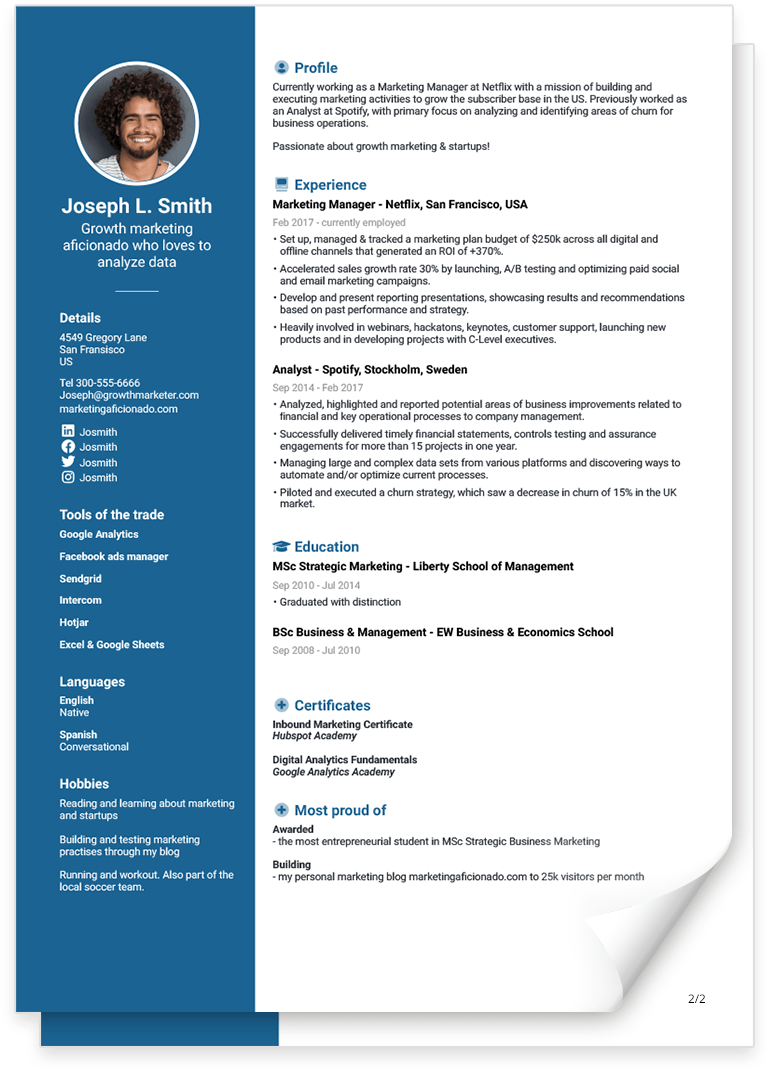
How To Write a Resume - The Ultimate Guide [2026]
![How To Write a Resume - The Ultimate Guide [2026]](https://jofibostorage.blob.core.windows.net/blog/how-to-write-a-resume-header.png)
TL;DR: How to write a resume in 2026
- A resume is a targeted marketing document, not a full work history
- Your resume must be readable by ATS, AI screening tools, and recruiters
- Structure, keywords, and measurable results matter more than visual design
- One generic resume is no longer enough — tailoring is mandatory
- AI can help write a resume, but only if you stay in control of the content
For most job seekers, a strong resume is still the gateway to a new job — but how resumes are evaluated has changed.
In 2026, your resume is rarely read by a human first. It is scanned, parsed, and ranked by applicant tracking systems (ATS) and AI-powered screening tools before it ever reaches a recruiter. That means a great resume today must do more than “look good” — it must be structured correctly, keyword-aligned, and easy for both machines and humans to understand.
In this guide, you’ll learn how to write a resume that actually gets read. We’ll walk you through a clear, step-by-step process for creating a resume that works in modern hiring systems, with practical tips you can use immediately. You’ll also see real examples, common mistakes to avoid, and proven best practices that still hold up in 2026.
If you’re applying outside the US, you might instead be looking for a guide on how to write a CV.
Read on to learn:
- What a resume is — and how it differs from a CV
- How to write a resume tailored to a specific job
- Which resume format works best for ATS and recruiters
- How much (and how little) information to include
- The most important dos and don’ts when writing a resume
- How to use AI to write your resume the smart way
What is a resume?
A resume, or a CV as it is called outside of the US, is a short, targeted document that summarizes your most relevant work experience, skills, and achievements for a specific job. Its purpose is simple: to secure a job interview.
In many parts of the world, the term resume is used interchangeably with CV. However, there is an important distinction:
- A resume is typically 1–2 pages, tailored to a specific role, and focused on impact and results
- A CV (curriculum vitae) is often longer and provides a more comprehensive overview of education, research, and career history
In modern hiring processes, a resume is rarely read by a human first. Instead, it is scanned and ranked by applicant tracking systems (ATS) and AI-based screening tools. These systems evaluate structure, section headings, keywords, and relevance before a recruiter ever sees the document.
For that reason, a resume should be treated as a professional marketing document and not a full employment history. Every section must be intentional, easy to scan, and aligned with the requirements in the job description.
As a general rule:
- Most candidates should keep their resume to one or two pages
- Senior, academic, or highly specialized roles may require more space
- Clarity, relevance, and structure always matter more than length
A strong resume doesn’t try to tell your entire story. It highlights why you are a good match for this job, using clear language, measurable results, and a format that works for both machines and humans.
A resume is a concise, job-specific document that highlights relevant experience, skills, and achievements to help candidates pass ATS screening and secure a job interview.
Resume vs CV: What’s the difference?
| Aspect | Resume | CV (Curriculum Vitae) |
|---|---|---|
| Primary purpose | To secure a job interview | To provide a complete career overview |
| Typical length | 1–2 pages (job-specific) | 2+ pages (often much longer) |
| Customization | Tailored for each job application | Rarely tailored |
| Content focus | Relevant experience, skills, and measurable achievements | Full education, work history, publications, research |
| Use of keywords | High importance (ATS and AI screening) | Lower importance |
| Formatting style | Structured, concise, ATS-friendly | More detailed and comprehensive |
| Common regions | United States, Canada, private sector roles globally | Europe, academia, research, medical fields |
| Recruiter expectation | Quick scanning and ranking | In-depth review |
| Update frequency | Updated for each job | Updated periodically |
In short: a resume is a concise, job-specific document optimized for ATS and recruiters, while a CV is a longer, comprehensive record of education and career history.
Already have a resume?
Upload it and let us turn it into an ATS-safe, editable resume you can tailor for each job.

How to write a resume for a job you want - a step by step guide
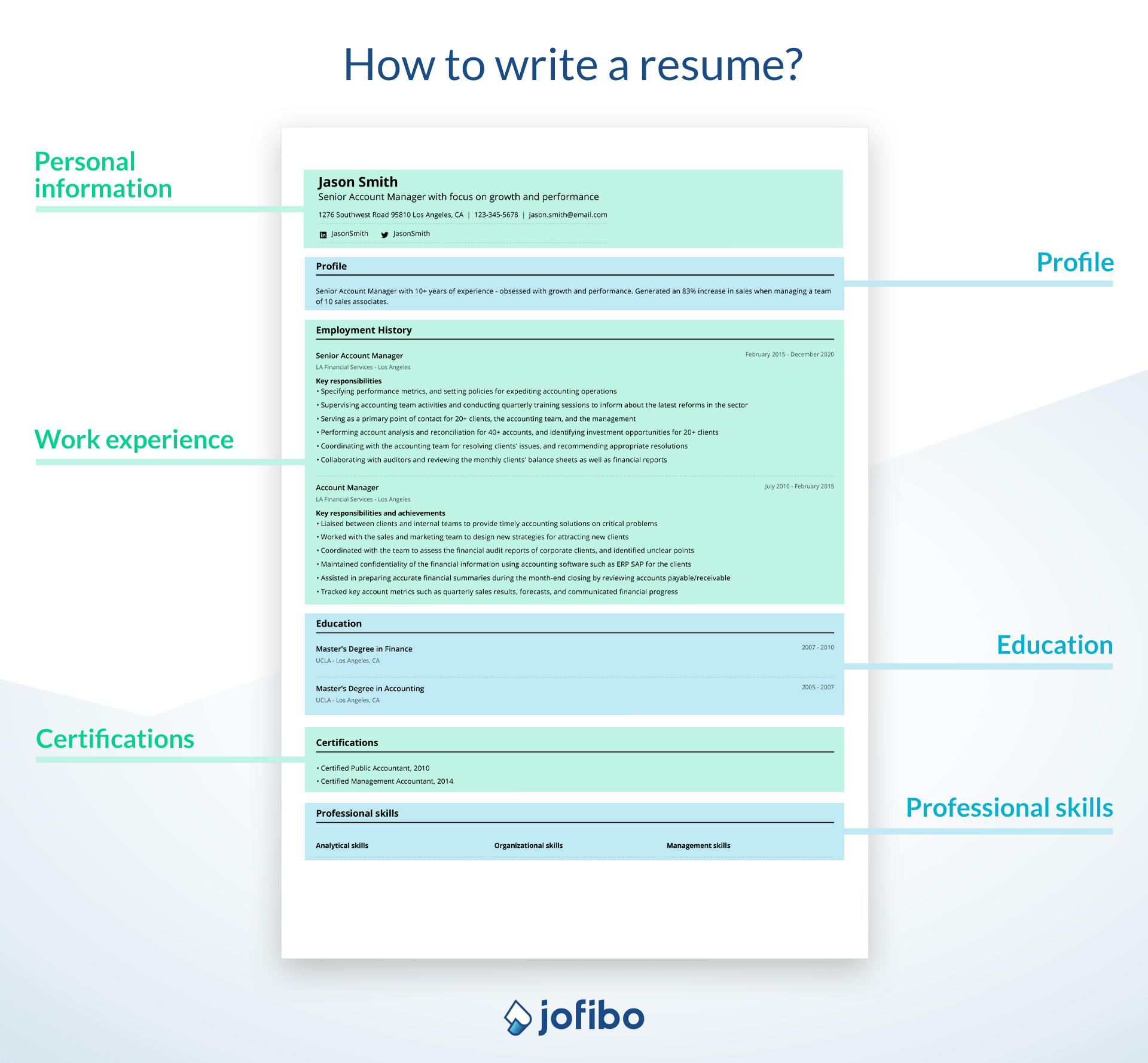
Writing a resume is kind of like following a recipe. There are variations for how to do it but the end-goal is the same: to land job interviews and get hired. Below is a clear and short step by step guide to write a resume. Each step will be explained in detail with tips and tricks. You can click on each individual step you want to read about.
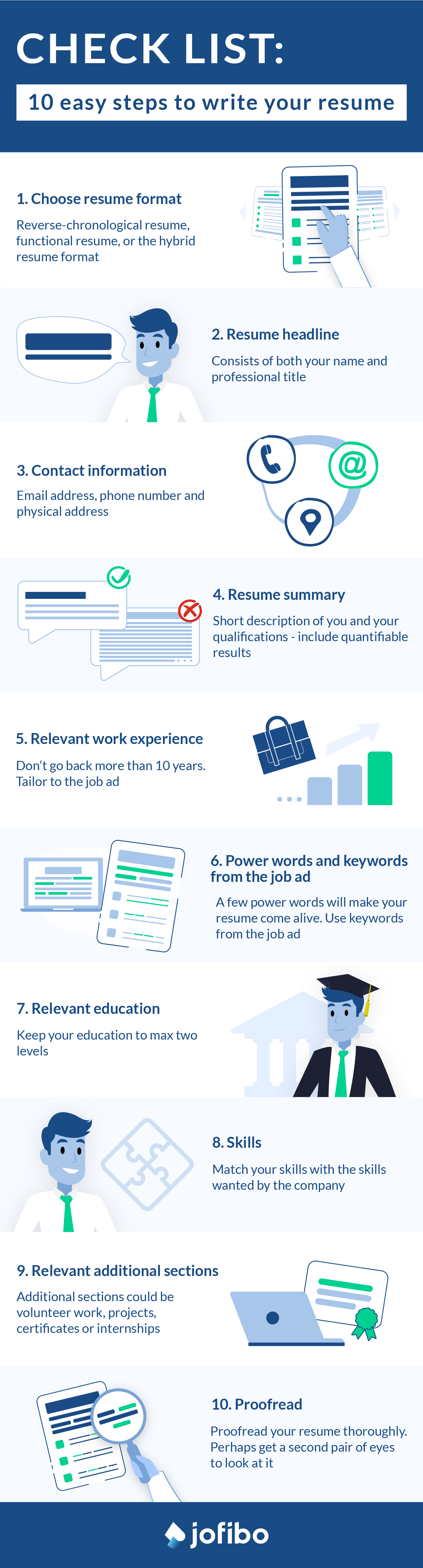
- Choose your resume format
- Write your resume headline (customize it to the job ad)
- Add your contact information
- Write a short and catchy resume summary (customize it to the job ad)
- Add all your relevant work experience in a reverse chronological order (meaning you list your most recent job in the beginning of your resume)
- Make sure to use power words and correct key words
- Add your latest education (keep it at max. two levels)
- Add your skills to your resume (customize them to the job ad)
- Optional: Relevant additional sections such as volunteer work
- Proofread
1. Choose the right resume format
When it comes to deciding on which resume format you should go for, there are a few options. Which one you should choose depends on your situation. The three resume formats are:
- The reverse chronological resume format: This is by far the most popular resume format and the one employers are most familiar with. Choose this format if you have extensive relevant work experience.
- The functional (skill based) resume format: This resume format is ideal if you’re making a career change or if you lack relevant work experience.
- The hybrid (combination) resume format: With this resume format you get the best from each world. Choose this format if you have relevant skills but no extensive work experience yet.
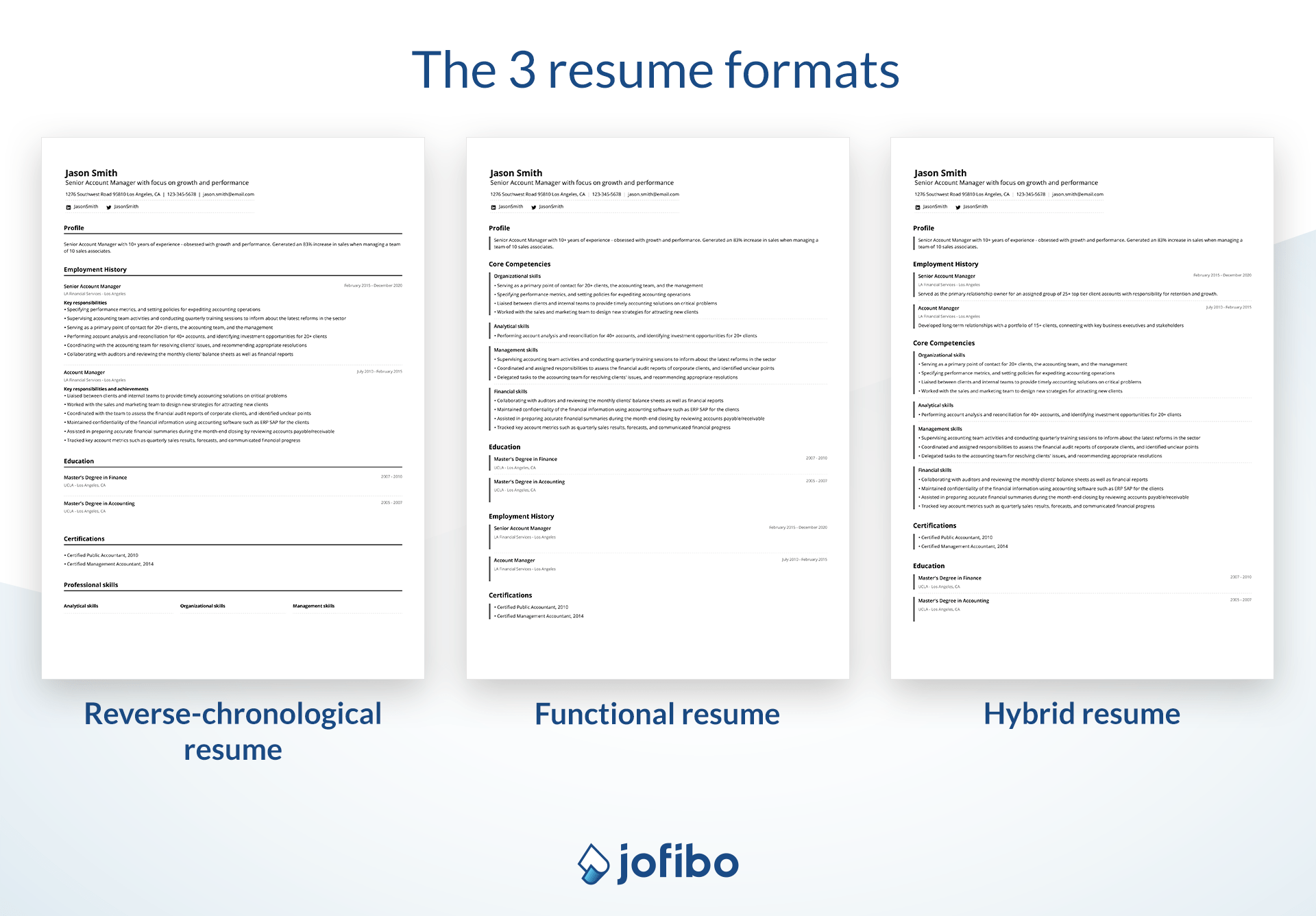
In most situations you should go for the reverse-chronological resume format since this is the resume format that most clearly shows how your career has progressed over time. For that reason this guide will be focused on a resume with this format.
ATS-safe formatting basics
No matter which resume format you choose, your resume must be easy for applicant tracking systems (ATS) to read. Many resumes are rejected or misread simply because the formatting is too complex.
If you want to see exactly what ATS can and can’t read, we tested graphic resumes against ATS-friendly templates in detail in our guide on ATS-friendly resumes vs. graphic resumes.
To keep your resume ATS-safe, follow these basic rules:
- Use a single-column layout with a clear top-to-bottom structure
- Avoid text boxes, tables, icons, charts, and graphics
- Use standard section headings like Work Experience, Education, and Skills
- Stick to common fonts and consistent spacing
- Save and submit your resume as a PDF or DOCX, unless the job ad specifies otherwise
An ATS-safe resume doesn’t need to look boring - it just needs to be predictable, structured, and easy to parse. Clear formatting ensures your experience, skills, and keywords are read correctly before a recruiter ever sees your application.
2. Resume headline
Your resume’s headline consists of your name and your professional title. When you write your headline you should use the job title from the job ad. Add a little bit of extra pazazz by including some details about you. For example: Senior Account Manager with Focus on Growth and Performance.
Some larger companies use applicant tracking systems. By being strategic with your professional titles you maximize your chances of them recognizing you as a strong candidate. For example, if the company is looking for a Marketing Manager, but your previous title was Marketing Executive, you write Marketing Manager.
Why job title matching matters
When writing your resume headline, accuracy matters more than creativity — especially in modern hiring systems.
Exact job title matching improves ATS ranking
Applicant tracking systems compare your resume headline to the job title in the posting. Using the same or a very close match increases your chances of being correctly categorized and ranked.
AI screening tools interpret titles semantically
AI doesn’t just read words — it groups related titles. However, the closer your headline matches the employer’s terminology, the more confidently the system identifies you as a relevant candidate.
“Creative” job titles reduce discoverability
Titles like Growth Wizard or Marketing Ninja may sound fun, but they often fail ATS and AI matching. Standard, widely recognized titles make your resume easier to find and evaluate.
3. Contact information
You now know how to choose the right resume format and what to write as a headline. You’re well on your way to create an awesome resume. Next up is your contact information.
Your contact information should be below your resume’s headline. You should include the following:
- Email address (make sure it’s appropriate and professional)
- Phone number
- Physical location (zip code, city, country is often enough - no full address needed)
- Avoid personal data (DOB, marital status, photos)
- Optional: portfolio / GitHub / Notion (role-dependent)
It’s also an option to add your social media accounts such as LinkedIn but keep in mind that you invite the recruiter to look at them. So be sure that all your social media content is sober if you choose to add your profiles to your resume. We recommend only adding your LinkedIn profile here.
4. Resume summary
A strong resume summary, or profile, will definitely set you apart from your competitors. The resume summary is a brief description of you and your qualifications in relation to the job you’re applying for. Therefore it’s critical that you target the right keywords from the job ad to make sure you grab the recruiter’s attention.
If it’s been more than 10 years since you last wrote a resume, you might know this part as a resume objective. However, an objective could make your resume appear a bit old fashioned which is why we recommend you use a resume summary, or resume profile.
Your resume summary needs to strike the right balance between keyword relevance and human readability. Applicant tracking systems and AI screening tools look for important terms from the job description, but overloading your summary with keywords can make it unreadable and suspicious.
To get this balance right:
- Identify the top 5–7 keywords or phrases from the job ad (job title, core skills, tools, and seniority level)
- Mirror these keywords naturally in your summary, using complete sentences
- Avoid keyword stuffing - repeated or awkward phrasing can reduce credibility with both AI and recruiters
The goal isn’t to copy the job ad word for word. It’s to show clear alignment between your background and the role, while keeping the summary concise, human, and easy to scan.
You will want to keep the summary short and sweet. About 50 words or even less. Think quality over quantity.
For example:
“Bilingual, creative, patient and dependable kindergarten teacher with more than 4 years of experience teaching 5-6 year olds. Committed to providing students with necessary tools to achieve academic goals.”
5. Relevant work experience
Your work experience section is the most important part of your resume because this is where you show your qualifications for the job.
While it may be tempting to add all of your previous work history, don’t. The key here is the word “relevant”. When you add your work experience to your resume make sure you only include the relevant experiences. And don’t go back more than 10 years. It’s better to have a few relevant professional experiences than a tangle of odd jobs here and there with no relevance to the job you’re applying for.
To make sure your resume is both logical and informative you will want to list your work experience in a reverse-chronological order. This means you need to add your most recent at the top and work your way backwards to your least recent at the bottom.
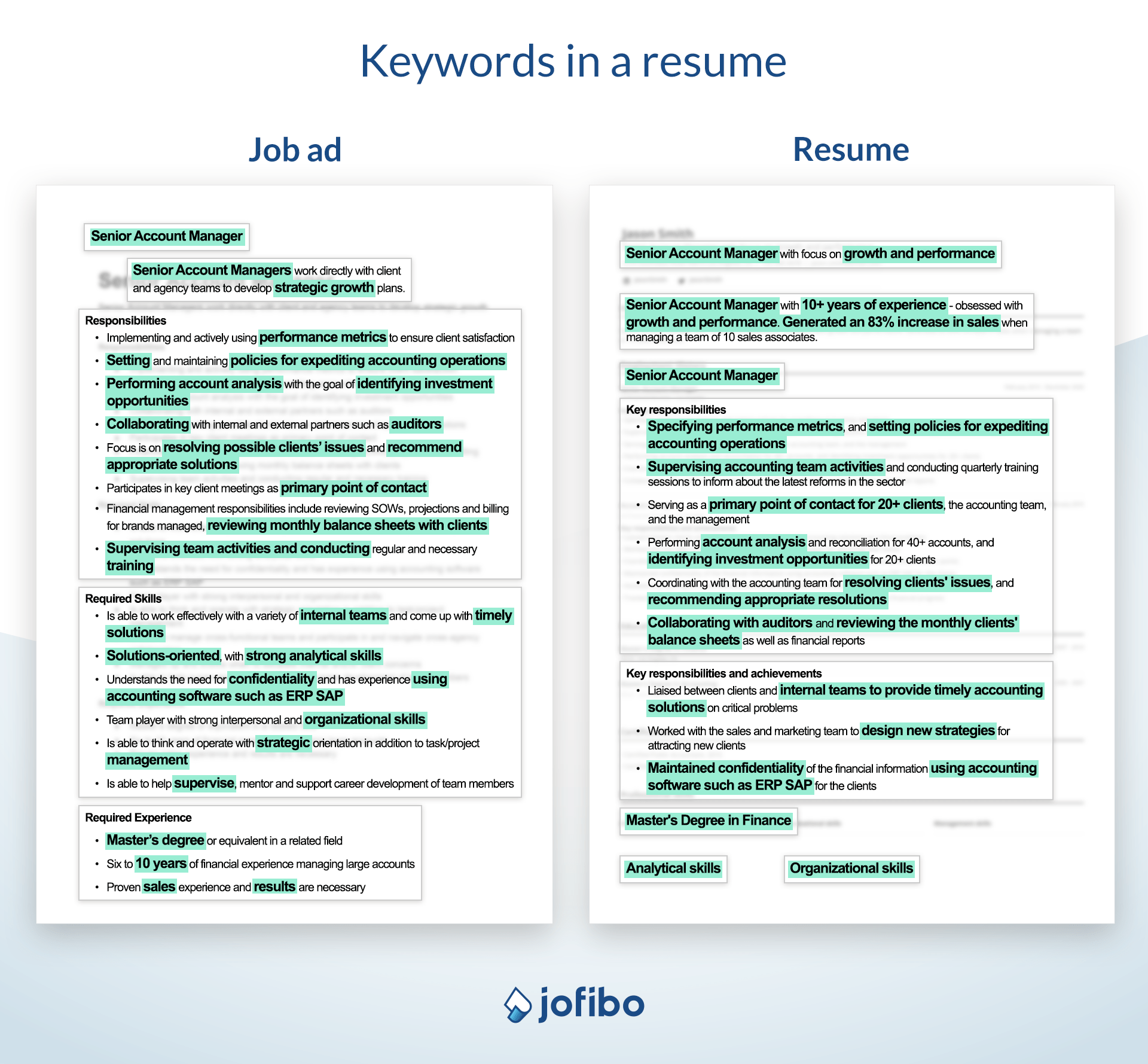
For each work experience you add to your resume make sure you’ve optimized it as much as possible for the job ad. That means you need to use the same terms as in the job ad wherever possible - eg. professional title.
When you describe your previous work experiences it’s an advantage to use bullets to highlight your results and achievements. Hiring managers love this. If you have any quantifiable results make sure you use them as much as possible. This will make your resume much easier to read.
Build each work experience using this formula:
- Your title
- Company name
- Company location (city and state)
- Dates of employment (month and year)
If you’re still currently working at a company, you can simply write “[month], [year]–present” for the employment dates.
[When you use a resume builder like Jofibo this is automatically formatted for you so you don’t have to worry about keeping it neat].
Include about 3–5 bullet points of your main duties and achievements working in that role with this formula:
- Start your bullet point with an action verb
- Add a quantifiable point
- Mention a specific and relevant job duty
Like this:
- Created lesson plans and prepared 90+ students for quizzes and exams
- Taught 3 classes where 95% of students passed their exams with a minimum of 2.9 GPA
But remember; if a bullet doesn’t show impact, it’s noise.
To create an even better work experience section it may be a good idea to check out the STAR method. With this method you can easily structure your work experience in a way that lets the employer know exactly how you can contribute value to the company.
Don’t have a lot of work experience yet? Don’t worry; check out how to write a resume with no experience.
6. Power words and keywords
By now there should be no doubt that you need to tailor your resume to each job ad. One way of doing this is by making sure you align your terms with the terms used in the job ad. Thoroughly read the job ad and highlight the experiences and skills that the company is looking for. Make sure you use them in the description of you, your skills, and work experience. Then use our AI powered Match With Job Position tool to make sure your resume matches the requirements perfectly.
Also make sure you add power words to your resume. Power words and action verbs have a great effect on the people reading your resume. They will make you seem even more competent and professional and will make your resume come alive. As with everything else though, don’t overdo it.
7. Relevant education
Adding your education to your resume is a vital way to show your potential employer that you have the necessary knowledge to maintain the position. But don’t add all your education from elementary school up until your phd. Only add the latest finished degree and any relevant courses and certificates you’ve attained, and don’t add more than two levels of education. The key is to keep it relevant.
So should you include your high school diploma? Yes, if it’s your latest finished education. If you’ve also finished college, don’t bother with adding your high school diploma.
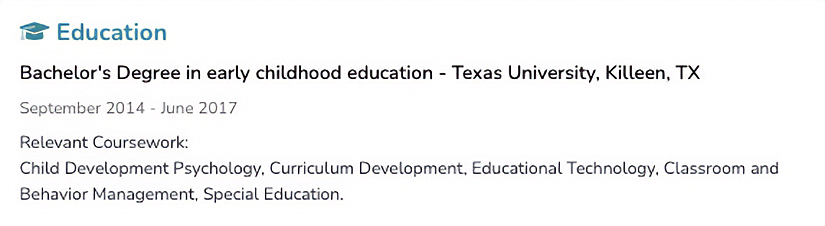
Here is how you should add your education to a standard education section:
- Your major
- The name of your university, community college, or technical school
- Location of the school (city, state)
- Date of graduation (month, year)
Here’s how it looks “behind the scenes” in our resume builder:
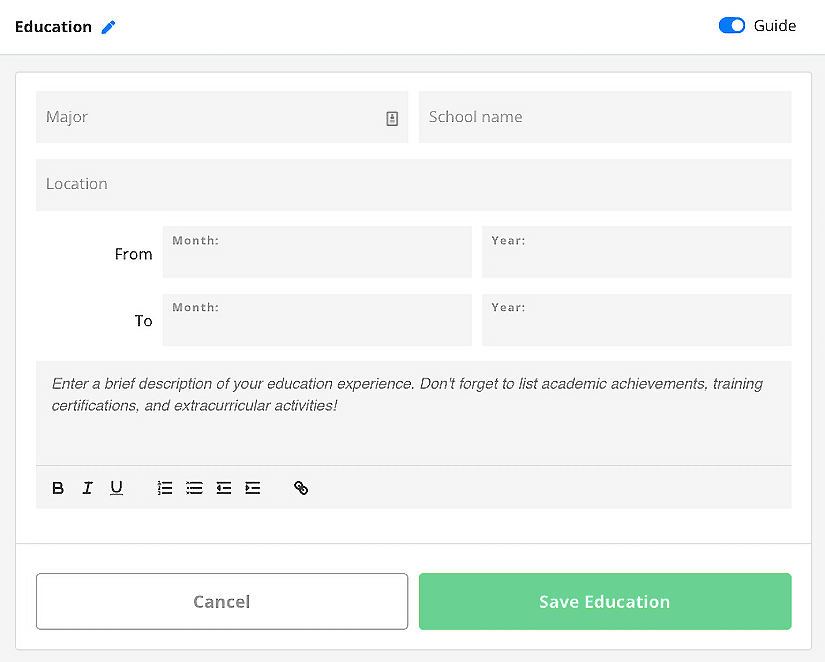
As you can see it’s just a matter of entering your data and you’re all set. The outcome looks like this:
8. Skills
Your soft skills and hard skills are an essential part of your resume. Hiring managers will be on the lookout for certain skill sets and it is your job to show that you have the skills they need.
But keep in mind that not all of them carry the same weight in modern hiring systems.
Hard skills are ATS-critical
Applicant tracking systems and AI screening tools rely heavily on hard skills — such as software, tools, certifications, and technical abilities — to match candidates to job requirements. These skills should be listed clearly and consistently using the same terminology as the job description.
Soft skills are better shown through experience
Soft skills like communication, leadership, and problem-solving are important, but they are often too vague to evaluate on their own. Instead of listing them in a skills section, it’s more effective to demonstrate them through concrete examples and results in your work experience bullet points.
A strong resume uses the skills section to highlight job-relevant hard skills, while letting soft skills appear naturally through measurable achievements and responsibilities elsewhere in the resume.
A great way of adding your most relevant skills to your resume is to showcase them in your summary and in your work experience. And of course you should also add your most valuable skills in the skills section. This goes particularly for any technical skills or software skills you may have.
Your hard skills are the quantifiable, job-specific abilities that you learn through education, training or through your work experience. Language skills, computer skills and being able to handle heavy machinery are all examples of industry specific hard skills.
Soft skills, or interpersonal skills as well, on the other hand, are the skills that are a part of your personality. They are the personal characteristics that positively influence how you work and interact with other people. These skills are not easily taught in a classroom. Skills such as verbal and non-verbal communication, problem solving and critical thinking are all examples of soft skills that are highly valued by most employers.
9. Optional: Relevant additional sections
This part of your resume is optional and should only be added if it’s relevant to the position. An additional section could be volunteering, if you can show how it’s beneficial to the company that’s hiring. This will show that you’re a dedicated person and employers love that. Other examples of relevant extra sections for your resume include projects, certificates, hobbies, or internships.
10. Proofread
The last step before submitting your resume and other application documents is to proofread. Always proofread your work a little while after you’ve written it. What sounded great while you wrote it, might not sound as great later in the day or even the day after.
When you write resumes for different job positions (and of course you always tailor your resume to the relevant job position) it is so easy to accidentally write the wrong company name or make another embarrassing mistake. Don’t be that person.
Also, it’s a good idea to get a second pair of eyes to look over your resume. So hand it over to your spouse, a family member, or a friend to let them give it a run-through. If something is unclear to them it’s a good indication that you need to make some adjustments.
But proofreading your resume isn’t just about catching typos. Before you submit, you also need to make sure your resume works correctly in ATS and AI screening systems.
Before sending your application, make sure to:
- Run an ATS parsing test to confirm that section headings, job titles, dates, and skills are read correctly
- Remember that spellcheck does not equal ATS-safe — a resume can be error-free and still fail if the formatting breaks parsing
- Validate your formatting by checking that content appears in the correct order when copied into a plain text document
A final technical check helps ensure your resume is interpreted exactly as intended — and that your qualifications don’t get lost before a recruiter ever sees them.
Do a final check using this list:
- Job title in your headline matches the job ad exactly or very closely
- Standard section headings are used (Work Experience, Education, Skills)
- All dates, job titles, and company names are parsed correctly in an ATS preview
- No text is hidden in icons, text boxes, tables, or graphics
- Hard skills and tools are spelled exactly as in the job description
- Resume reads logically when copied into a plain text document
- File format matches the employer’s instructions (PDF or DOCX)
If your resume passes this checklist, it’s far more likely to be read correctly, ranked accurately, and reviewed by a recruiter.
4 great advice for your resume
If you’ve ever asked yourself “How to write a good resume?” I hope this article has helped you. As a small bonus we’ve found four additional pieces of advice for your resume. They will make you appear confident, competent, and professional.
First of all, where do you think the recruiter gets their very first impression of you? In the email you send along with your resume and cover letter. It has to be on point.
Make sure:
- You use the recruiter’s name (just like in your cover letter)
- It’s well written and without grammatical errors or typos
- You remember to attach your documents (this is a classic error so double check before hitting that send-button)
- You finish with a call to action where you let the recruiter know that you are available on email and phone for any further questions
As you can see there are a lot of dos and don’ts when it comes to how to write a resume. To make it easier for you to learn how to write a resume, we’ve made a list. We hope this will help you navigate the resume-jungle.
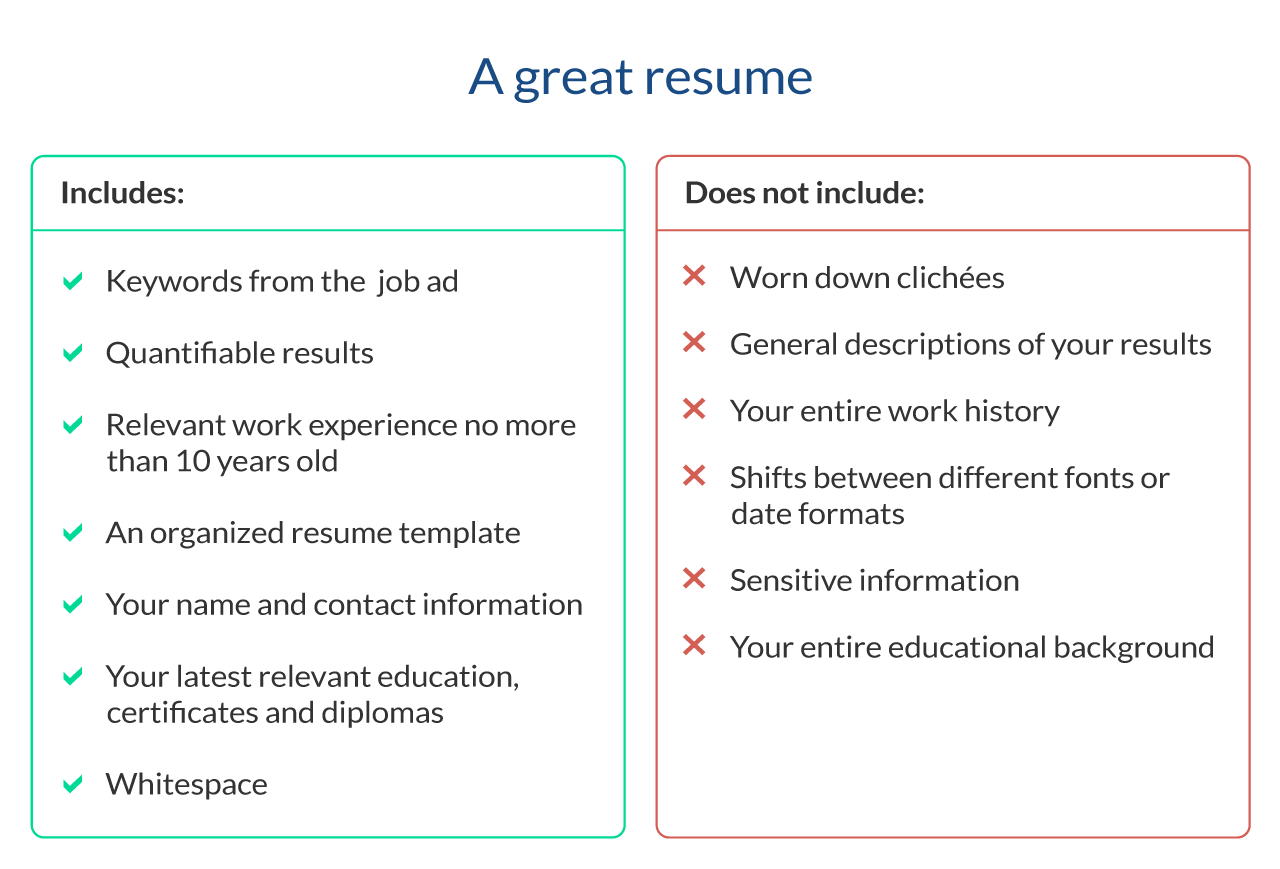
Dos and don’ts when writing your resume
Do
- Use power words such as “achieve”, “manage”, “resolve”, “launch” (in moderation)
- Quantify your achievements (“grew revenue with 57% during first year of employment”)
- Include relevant previous jobs since the past 10-12 years
- Use a resume template that will present your resume in an ordered and pleasing-to-the-eye manner
- Include your name and contact information
- Include your latest educational degree, relevant certificates, and diplomas
Don’t
- Use worn out terms like “go-getter”, “think outside the box”, “synergy”
- Describe your achievements generically (“was responsible for a much higher revenue during first year of employment”)
- Include all previous jobs since you had that news paper route
- Shift between fonts, use up all the white space, or change between date formats
- Include sensitive personal information like social security number
- Include all education since elementary school
- Create overdesigned resumes
- Add AI-generated fluff
- Do keyword stuffing
Using AI to write your resume (the smart way)
AI tools can be a powerful help when writing a resume but only when used correctly. The most effective resumes are still driven by human judgment, with AI acting as a supporting tool.
AI works best as an assistant, not an author. It can help you structure sections, rephrase bullet points, and identify missing keywords, but it can’t replace your understanding of your own experience or the specific job you’re applying for.
One of the biggest risks of using AI is generic output. AI-generated resumes often sound polished but vague, lack measurable results, and use the same phrases as thousands of other candidates. Recruiters and screening systems are increasingly good at spotting this.
That’s why human editing is essential. Always review, personalize, and fact-check AI-generated content. Make sure your resume reflects your real achievements, uses your own language, and stays tailored to the job description.
If you want to use AI effectively — without losing control of your resume — read our guide on how to use AI for your resume.
Build a resume that gets read — fast.
Create an ATS-safe resume in minutes, tailor it to each job, and use AI as a smart assistant — not a replacement for your experience.

![Server Resume Examples [Guide & Tips]](https://jofibostorage.blob.core.windows.net/blog/server-resume-examples-header.png)
![Cashier Resume Sample & Template [2026 Guide]](https://jofibostorage.blob.core.windows.net/blog/smiling-caucasian-female-cashier-with-short-blonde-hair-and-eyeglasses-using-cash-register.jpg)