ATS‑Friendly Resume vs. Graphic Resume: What Actually Gets Read?
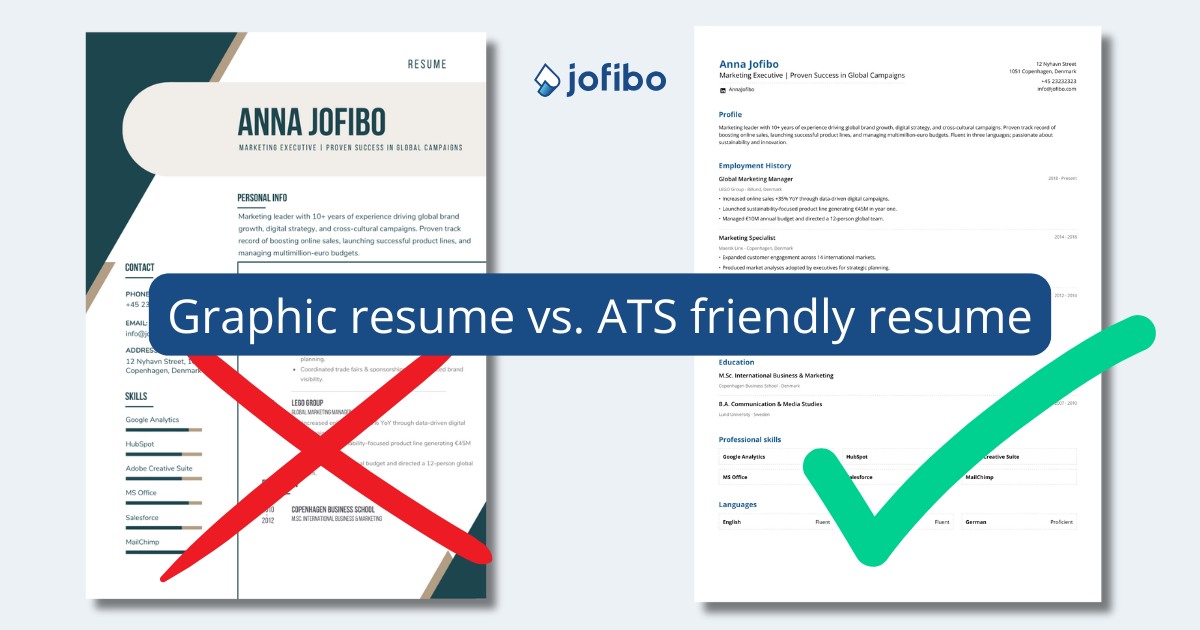
What matters most in your job search? A visually striking resume filled with icons, graphics, and flair or a well‑structured resume that’s easy to read and work with?
That’s a rhetorical question.
The most important thing for your job search is a strong, targeted resume that can be read by both applicant tracking systems (ATS) and real people. And that’s where many candidates run into trouble: visually impressive resume templates often look great on screen, but can be difficult for ATS platforms to interpret correctly.
In this article, we compare Jofibo’s ATS‑friendly resume templates with graphic‑heavy resumes and explain what the differences mean for your chances in modern hiring processes—especially in the U.S. market.
Why ATS Matters for Your Resume
Most mid‑to‑large employers in the United States use an Applicant Tracking System to manage job applications. In practice, an ATS is used to collect, organize, and structure resume data, and in many cases to:
- Parse resumes into searchable fields (job titles, employers, dates)
- Identify relevant skills and keywords
- Support filtering, ranking, or prioritization workflows
- Help recruiters manage high application volumes
Importantly, most ATS platforms primarily work with text—not visual elements.
That means resumes built with icons, graphics, colored boxes, images, tables, or complex layouts can break down when processed by the system. They may look polished to a human reader, but the underlying technology can work against the candidate.
That said, this does not mean an ATS automatically rejects candidates. To understand why, it’s important to clarify what ATS really means in practice.
What ATS Really Is (and Isn’t)
There are many myths about ATS, one of the most common being that candidates must “optimize their resume for a robot” to avoid being rejected.
That’s only partly true.
In many U.S. organizations, an ATS functions primarily as a candidate management platform, not an autonomous decision‑maker. Similar to how a CRM supports sales teams, an ATS helps recruiters and talent acquisition teams:
- Receive and organize applications
- Create candidate profiles
- Store resumes and cover letters (often both parsed and as attached files)
- Search, filter, and review candidate information efficiently
This means your resume can be a Word document, a PDF, visually styled, or plain text and in many cases, it will still be reviewed by a human recruiter or hiring manager.
While some U.S. companies do use advanced features such as AI‑assisted matching, ranking, or knockout questions—especially in high‑volume hiring—these tools are implemented differently from company to company and are often independent of visual resume design.
So no: you don’t need to write your resume for a robot. And no: you don’t need to worry about secret ATS algorithms.
If ATS rarely rejects candidates automatically, why talk about ATS‑friendly resumes at all?
The answer is robustness—not automation. In real hiring workflows, resumes are often:
- Parsed into structured candidate profiles
- Converted between formats
- Copied, exported, or forwarded internally
- Viewed in different system interfaces
In these steps, complex layouts, icons, text boxes, and graphic elements can cause issues. Not because the system “rejects” the resume, but because content may be misread, reordered, or lost entirely. That’s exactly what our tests demonstrate.
So the recommendation is simple:
Write your resume for people. But avoid unnecessary technical risk. Choose a resume format that is:
- Easy to read
- Stable across systems
- Less likely to lose critical information
A clean, text‑based resume doesn’t guarantee a job but it helps ensure that what you wrote is actually what gets read.
You don’t need to start from scratch.
Upload your current resume and see how it performs in an ATS-friendly format.

The Problem with Graphic‑Heavy Resumes
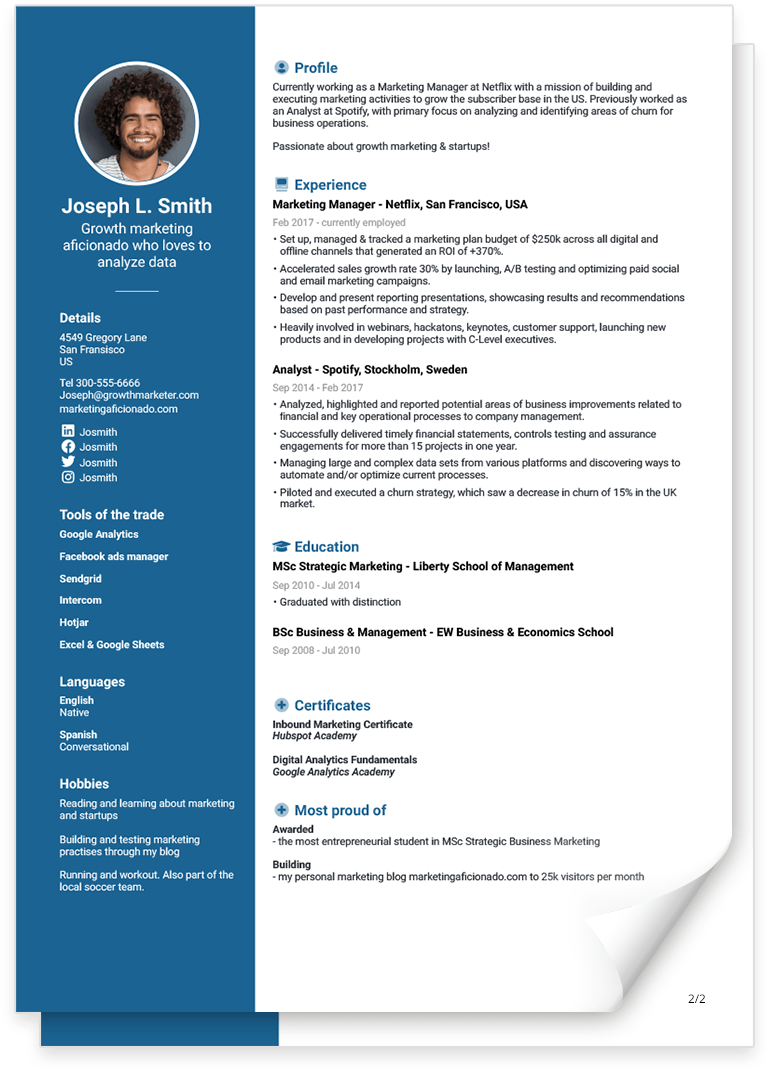
Graphic resumes have become increasingly popular through tools like Canva and VisualCV. They stand out visually but they’re not built with ATS processing in mind.
Common issues we see include:
Text saved as images
The ATS treats it as a picture and can’t read it.
Icons replacing text
A skill icon without text often isn’t recognized.
Multi‑column layouts
ATS reads left‑to‑right, not visually.
Dates inside decorative text boxes
Employment timelines can disappear or be misinterpreted.
Key information fragmented or lost
Job titles, education, skills, and dates may end up scrambled.
In short:
You send a resume that looks finished. The ATS receives something closer to broken pieces.
Testing a Graphic Resume vs. a Jofibo Resume
To understand the impact in practice, we tested a graphic‑heavy resume against a Jofibo ATS‑friendly resume.
(No job seekers were harmed in the process.)
How We Tested
We evaluated both resumes using three methods that reflect how ATS platforms typically process resumes.
Test 1: Online ATS Simulator
We uploaded both resumes to an online ATS simulator to examine how content was parsed into structured fields like experience, education, and dates.
The simulator doesn’t represent a specific ATS vendor, but it provides a realistic view of how systems respond to complex layouts.
Jofibo Resume Results
- Experience and job titles parsed in the correct order
- Education recognized as a distinct section
- Employment dates correctly interpreted
- Overall structure preserved
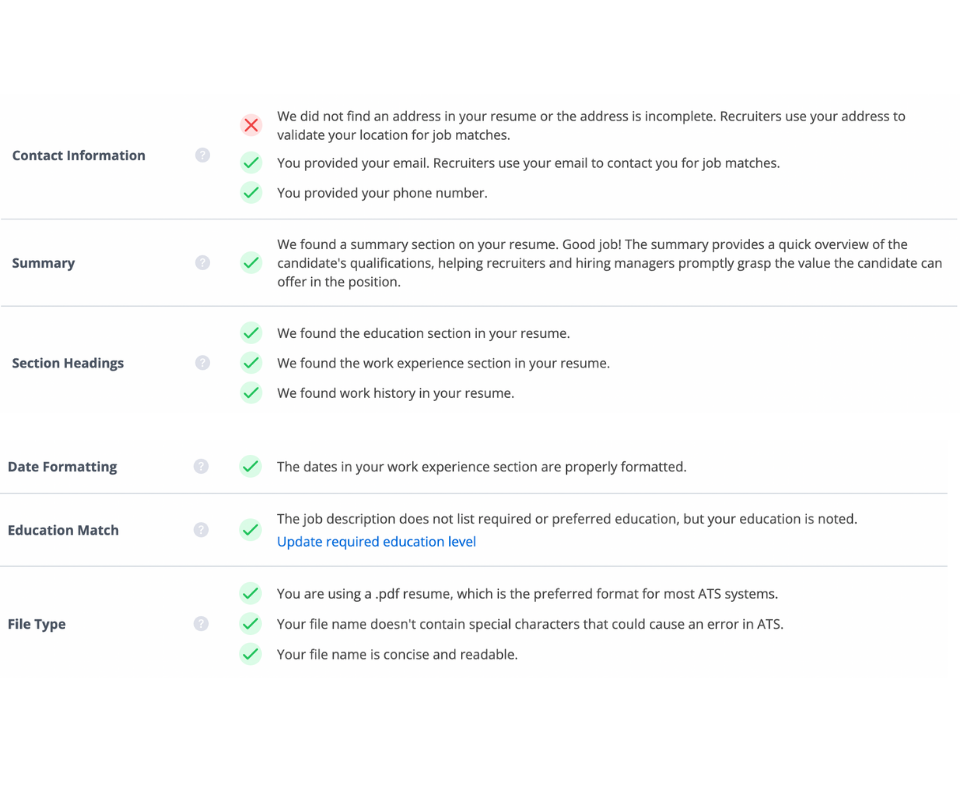
Graphic Resume Results
- Address not recognized
- Education omitted
- Employment dates misread or missing
- Resume structure fragmented
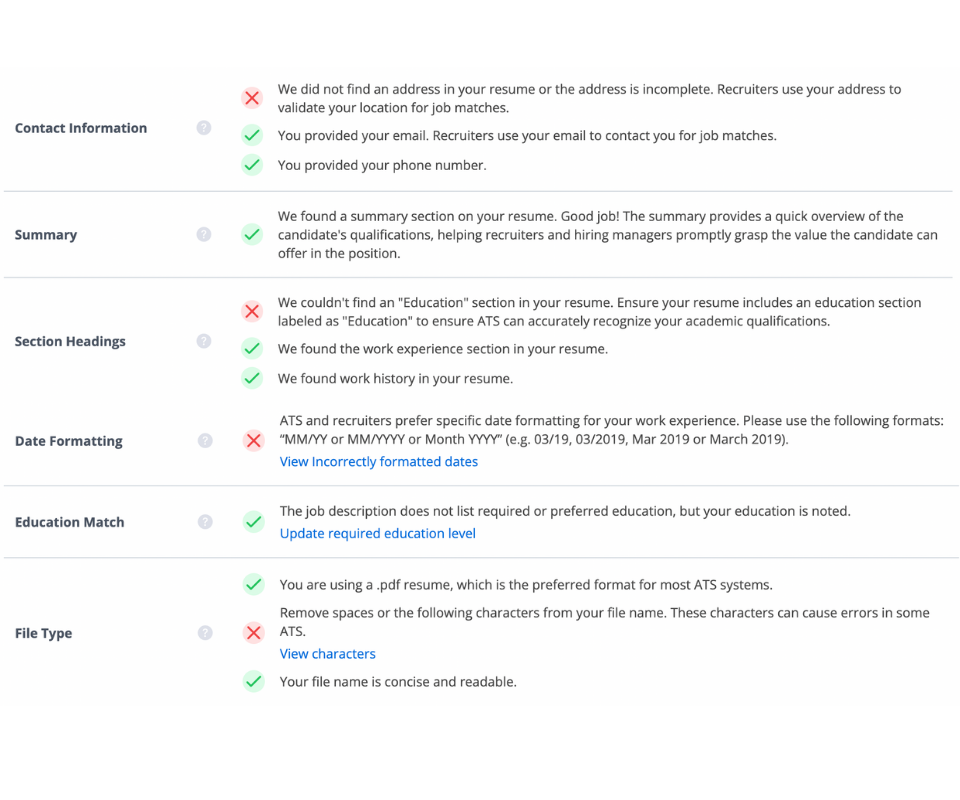
Conclusion
Graphic resumes can sometimes be converted to text, but critical information—especially education and dates—often gets lost. The Jofibo resume was parsed more consistently and accurately.
Test 2: PDF Opened as Google Doc
We uploaded both resumes to Google Drive and opened them as Google Docs to simulate text conversion.
Jofibo Resume Results
- Readable text
- Clear section separation
- Logical content flow
Graphic Resume Results
- Distorted text
- Mixed sections
- Missing or unreadable content
Conclusion
Complex layouts struggle when converted to plain text mirroring how ATS systems “see” resumes.
Test 3: Copy‑Paste Test
We copied all text from each PDF and pasted it into a blank Google document.
Jofibo Resume Results
- Recognizable sections
- Logical order
- Coherent content
Graphic Resume Results
- Unstructured text blocks
- No clear sections
- Illogical reading order
Conclusion
If text can’t be copied cleanly, an ATS won’t read it reliably either.
If text can’t be copied cleanly or it loses its structure when pasted, an ATS won’t be able to read it reliably either. The test illustrates why graphic-heavy resumes carry a higher risk in automated screening, while well-structured resumes preserve their content throughout the entire process.
What the ATS Tests Showed
We tested both a graphic-heavy resume and a Jofibo resume in three different ways: using an ATS simulator, by converting the PDF to Google Docs, and by manually copying and pasting all text from the PDF.
Across all three tests, results were consistent:
- Graphic resumes partially parsed but lost key information
- Complex layouts caused parsing errors and illogical order
- Jofibo resumes remained stable and structured
- Core sections (experience, education, skills) were consistently identified
- Risk of data loss was significantly lower
Bottom line: The difference isn’t cosmetic, it’s functional.
The ATS tests show that the difference between graphic-heavy resumes and structured, ATS-friendly resumes is not cosmetic, but functional. While graphic resumes carry a real risk of critical information being lost during automated screening, the Jofibo resume retains its structure and content throughout the entire process.
That’s why Jofibo’s resume templates are designed as a pragmatic, professional choice aligned with how modern hiring actually works.
Why Graphic Resumes Still Appeal (and Why That’s Risky in 2026)
Graphic resumes look professional, personal, and polished and in creative or portfolio‑driven roles, they can absolutely make sense. They signal that real effort has gone into them. For many job seekers, they feel like a way to stand out in a competitive job market.
In situations where a resume is printed or sent directly to a person, graphic resumes often perform well. They provide quick visual clarity for a human reader and can support a personal brand. The problem arises at the moment the resume goes through initial screening.
By 2026, most hiring workflows—especially in the U.S.—will be fully digital. Before a human sees your resume, it’s usually processed by an ATS. And that’s where graphic resumes are at a disadvantage.
Many are exported as PDFs where text is embedded in images or placed inside complex layout containers. The result: experience, education, and dates may be misread—or lost.
Graphic resumes can work in creative roles. For most other positions, they introduce unnecessary risk. In a hiring market largely driven by ATS, the winning resume isn’t the most creative one—it’s the one that gets read correctly.
Key Differences at a Glance
| Factor | Graphic Resume | Jofibo ATS‑Friendly Resume |
|---|---|---|
| ATS readability | Low | High |
| Risk of errors | High | Minimal |
| Layout | Creative but complex | Clean, professional |
| Human readability | Varies | Optimized |
| Industry fit | Creative roles | Most industries |
| Experience parsing | Unreliable | Stable |
| Skills parsing | Often lost | Fully read |
When a Graphic Resume Makes Sense
Graphic resumes aren’t wrong by default. They can be effective in roles where visual communication is part of the job.
This is especially true for:
- Graphic and visual designers
- UX/UI designers
- Art directors
- Portfolio‑based creative roles
In these cases, a graphic resume can support the candidate’s profile—especially when sent directly or paired with a portfolio.
However, even in creative fields, many U.S. companies still use ATS platforms as an initial step.
That’s why we recommend having two versions:
- One graphic resume for portfolios and direct outreach
- One ATS‑friendly resume for online applications
The ATS-friendly version ensures that your content is read correctly during automated screening. The graphic version can be used when a recruiter actually reviews your material.
It’s not either‑or. It’s a strategic approach to modern hiring.
How to Choose an ATS‑Friendly Resume Template (Checklist)
An ATS‑friendly resume doesn’t mean boring. It means structured and readable. It’s about having a structure that is clear, consistent, and easy to read both for systems and for people.
Make sure your resume has:
Clear section headings
Work experience, education, skills, and contact information should be clearly separated and labeled using standard headings that ATS platforms can recognize.
No heavy graphic elements
Icons, background colors, shapes, and decorative boxes can interfere with parsing and increase the risk of content being lost.
Standard fonts
Common fonts ensure that text can be read correctly across systems and isn’t converted into graphics during export.
Logical information order
ATS reads your resume in the order the content is structured. A consistent layout makes it easier to identify experience, dates, and skills.
A single-column layout
Using one column reduces the risk of text being read in the wrong order or mixed together during parsing.
Text instead of icons
Skills, languages, and contact details should be written as text. Icons without text are often ignored by ATS platforms.
Selectable (real) text — not images
Your entire resume should consist of real, selectable text—not text embedded in images or graphic elements. If text can’t be selected, an ATS can’t read it either.
All Jofibo resume templates are designed around these principles ensuring compatibility with ATS platforms while maintaining a professional look.
An ATS-friendly Jofibo resume template has clear sectioning, a single-column layout, standard fonts, and clean text without graphics or icons ensuring that experience, education, and skills can be read correctly by recruitment systems.
Choose the Resume That Gets Read
Graphic resumes can look impressive but they carry real technical risk in modern recruiting. When layout, icons, and graphics interfere with proper parsing, critical information such as work experience, education, and dates can be lost as early as the initial screening.
Structured, ATS‑friendly resumes reduce that risk and help ensure your qualifications are recorded accurately. They’re built so that both systems and people can understand the content.
In an ATS‑driven hiring process, the resume that wins isn’t the most creative—it’s the one that gets read correctly.
Already have a resume?
Import your existing resume and convert it into an ATS-friendly format in minutes.
Jofibos resume templates are designed with this exact purpose. The clean structure, the logical order of information and the absence of heavy graphical elements are not coincidences but purposeful design choices that reflect how recruiting actually takes place today.
Want to make sure your resume doesn’t just look good, but actually works?
Start with an ATS‑friendly resume template from Jofibo and give yourself the best chance to move forward.
![Nursing Cover Letter Example & Guide [2026]](https://jofibostorage.blob.core.windows.net/blog/Nursing-cover-letter.jpg)
![Electrician Resume Example & Guide [2026]](https://jofibostorage.blob.core.windows.net/blog/Electrician-Resume-Example-and-Guide.png)
![6 Foolproof Ways to Network [examples]](https://jofibostorage.blob.core.windows.net/blog/6-foolproof-ways-to-network.jpg)